


What Is ERP Software and How Does It Work?

 Jul 20,2026
  By Namrata Indalkar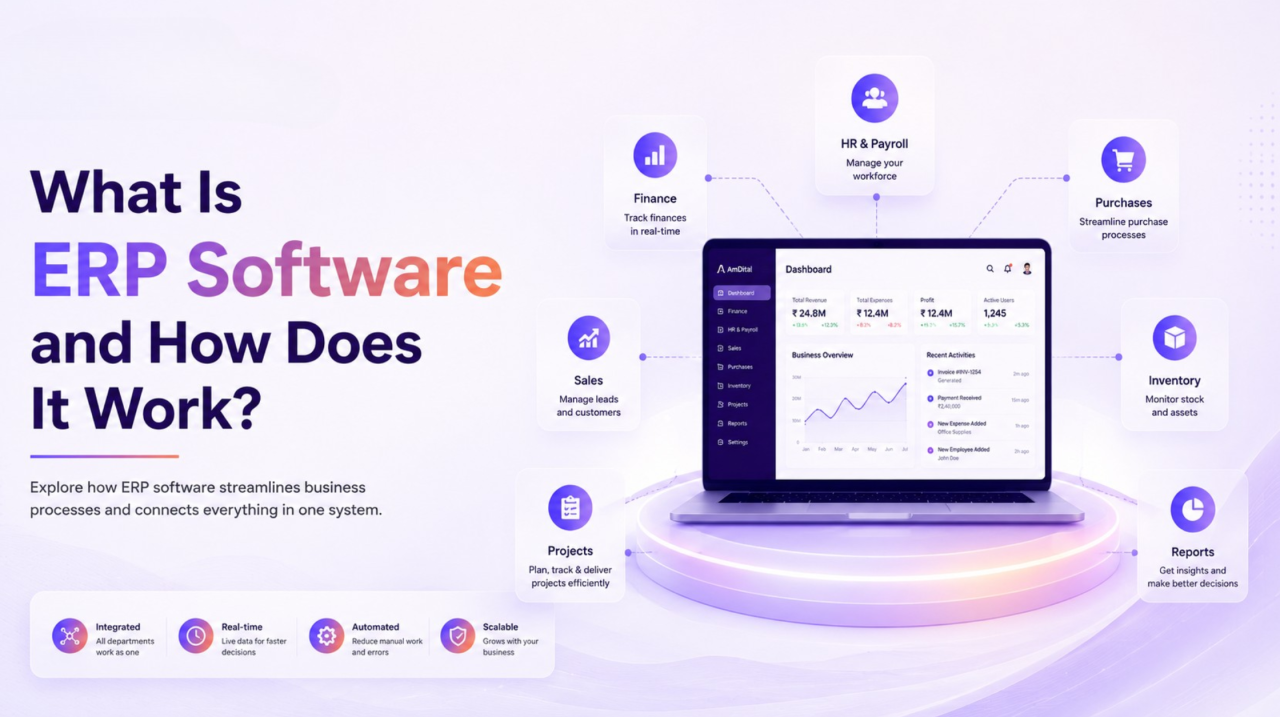
Running a growing business means managing multiple departments, processes, and data every day. Sales teams need customer information, finance tracks invoices and payments, HR manages employees, while operations oversee inventory and production. When each department relies on different tools, spreadsheets, or manual processes, information becomes scattered, communication slows down, and decision-making becomes difficult.
This is where ERP Software transforms the way businesses operate. Instead of using separate applications for every department, ERP Software connects your business processes into one centralized platform, allowing teams to work with the same real-time information. Whether you’re a startup preparing for growth or an established organization looking to improve efficiency, understanding how ERP works is the first step toward building a more connected business.
In this guide, we’ll explain what ERP Software is, how it works, its core components, and why businesses across industries are investing in Enterprise Resource Planning solutions to improve efficiency and drive long-term growth.
What Is ERP Software?
ERP Software (Enterprise Resource Planning Software) is an integrated business management system that helps organizations manage their daily operations through a single platform. Instead of using multiple disconnected applications, ERP combines essential business functions such as finance, human resources, inventory, procurement, sales, customer relationship management, manufacturing, and project management into one system.
Think of ERP Software as the central nervous system of your business. Every department works from the same database, ensuring information is updated in real time and accessible to authorized users across the organization.
For example, when a customer places an order, the information automatically flows through different departments:
- Sales records the order.
- Inventory checks product availability.
- Finance generates the invoice.
- Procurement receives stock alerts if inventory is low.
- Operations begin processing the order.
- Management dashboards update automatically.
Instead of manually transferring data between systems, every department stays connected through one integrated solution.
This is the core purpose of Enterprise Resource Planning bringing people, processes, and information together to improve business efficiency.
Why Do Businesses Need ERP Software?
Many businesses start with simple tools like spreadsheets, accounting software, and email. While these tools work during the early stages, they become increasingly difficult to manage as the business grows.
Common challenges include:
- Teams working with outdated information
- Duplicate data entry across departments
- Manual reporting that takes hours to prepare
- Communication gaps between teams
- Delayed approvals and slower decision-making
- Limited visibility into business performance
As operations become more complex, these challenges create inefficiencies that impact productivity and profitability.
ERP Software addresses these issues by creating one connected environment where every department works with accurate, real-time information.
Instead of spending time searching for updates or reconciling data from multiple systems, employees can focus on delivering value to customers and supporting business growth.
How Does ERP Software Work?
Understanding how the system works is easier than many people expect.
At the heart of every ERP solution is a centralized database. Every department accesses the same information, eliminating duplicate records and ensuring consistency across the organization.
Let’s look at a simple example.
Imagine a customer purchases products from your company.
Step 1: Sales Records the Order
A sales representative enters the customer’s order into the ERP system.
Immediately, the information becomes available to other departments.
Step 2: Inventory Updates Automatically
The inventory module checks stock levels.
If products are available, inventory is reserved for that order.
If stock is running low, the purchasing team receives an automatic notification.
Step 3: Finance Generates the Invoice
Without entering the information again, the finance department creates invoices, records payments, and updates financial reports.
Everything stays connected within the ERP platform.
Step 4: Operations Begin Fulfillment
The warehouse or operations team receives order details, prepares the shipment, and updates delivery status.
Customers receive accurate information while internal teams remain aligned.
Step 5: Leadership Gains Real-Time Insights
As every department updates information, dashboards automatically reflect current business performance.
Managers can monitor:
- Sales performance
- Inventory levels
- Cash flow
- Employee productivity
- Operational efficiency
This connected workflow demonstrates how the system works to eliminate manual processes while improving visibility across the organization.
The Core Modules of ERP Software
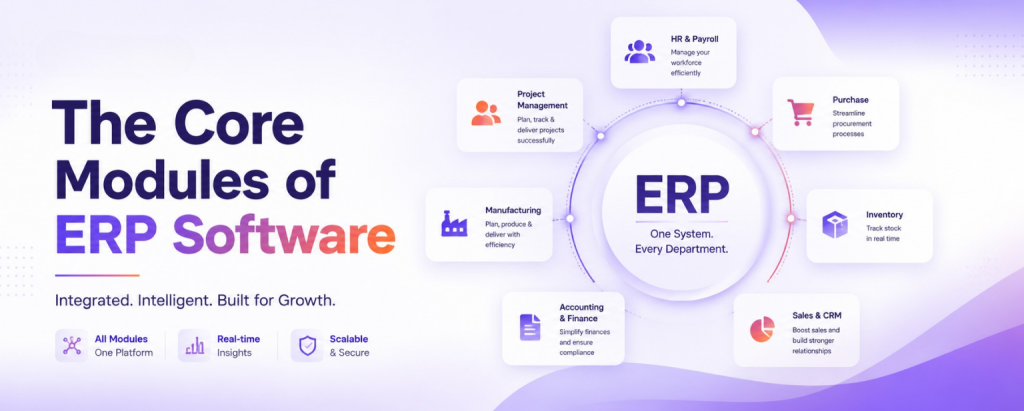
One of the biggest advantages of ERP Software is its modular design. Businesses can start with the modules they need today and expand as they grow.
Some of the most common ERP modules include:
Finance & Accounting
Manage invoices, payments, expenses, budgeting, tax calculations, and financial reporting from one centralized system.
Human Resources (HR)
Track employee records, attendance, payroll, leave management, recruitment, and performance reviews efficiently.
Sales & Customer Management
Manage leads, customer information, quotations, sales orders, and customer interactions without switching between multiple tools.
Inventory Management
Monitor stock levels, warehouse operations, product movements, purchase orders, and supplier information in real time.
Procurement
Simplify purchasing by automating vendor management, approvals, purchase requests, and procurement workflows.
Project Management
Plan projects, assign tasks, monitor deadlines, manage resources, and track progress through a centralized workspace.
Each module shares information with the others, allowing Enterprise Resource Planning to create a seamless flow of data throughout the organization.
Key Features of ERP Software
The effectiveness of ERP Software lies in its ability to centralize business operations while automating routine processes. Rather than managing different functions through multiple applications, businesses can rely on one integrated system that supports collaboration, improves accuracy, and provides real-time visibility.
Here are some of the key features that make ERP an essential business solution.
1. Centralized Data Management
One of the biggest strengths of ERP is maintaining a single source of truth.
Instead of storing information across spreadsheets and disconnected applications, every department works from the same database. This reduces duplicate entries, minimizes errors, and ensures everyone has access to the latest information.
2. Workflow Automation
Manual processes consume valuable time and often lead to mistakes.
ERP automates repetitive tasks such as invoice generation, purchase approvals, payroll processing, inventory updates, and order tracking. Automation not only saves time but also allows employees to focus on higher-value activities.
3. Real-Time Reporting
Business decisions are only as good as the information behind them.
Modern ERP Software provides real-time dashboards that display key performance indicators across finance, sales, HR, inventory, and operations. Managers no longer need to compile reports manually they can access business insights whenever they need them.
4. Cross-Department Collaboration
When departments work in isolation, communication gaps become inevitable.
ERP enables seamless collaboration by allowing teams to access shared information. Whether it’s sales coordinating with inventory or finance reviewing procurement expenses, everyone stays aligned using the same data.
5. Scalability
Businesses evolve over time, and their software should grow with them.
Most ERP platforms allow organizations to add new users, modules, and features as their operations expand. This flexibility ensures businesses don’t have to replace their systems every few years.
Benefits of ERP Software
Investing in ERP Software isn’t just about replacing outdated systems. It’s about creating a smarter, more connected way of working that supports long-term business growth.
Here are some of the biggest benefits organizations experience after implementing an ERP solution.
Improved Operational Efficiency
When routine tasks are automated and data flows seamlessly between departments, teams spend less time on administrative work and more time delivering results.
Employees no longer need to enter the same information multiple times, reducing errors and increasing productivity.
Better Decision-Making
Every business generates large volumes of data.
ERP transforms that data into meaningful insights through dashboards, analytics, and customized reports.
Business leaders can quickly identify trends, monitor performance, and make informed decisions based on real-time information rather than assumptions.
Enhanced Customer Experience
Customers expect fast responses, accurate information, and timely deliveries.
Since every department has access to updated customer and order information, businesses can respond more quickly to inquiries, process orders efficiently, and improve overall customer satisfaction.
Reduced Operational Costs
Managing multiple software applications often increases licensing costs, maintenance expenses, and administrative effort.
By consolidating essential business functions into one platform, ERP reduces software complexity and helps organizations optimize their operational costs.
Increased Productivity
When employees don’t have to search for files, reconcile data, or switch between several applications, they can focus on more strategic and productive work.
This leads to better collaboration and improved efficiency across the organization.
The Business Impact of ERP Software
The true value of ERP goes beyond technology. Its greatest strength lies in the positive Business Impact it creates across the entire organization.
Businesses that successfully implement ERP often experience improvements in several key areas.
Faster Decision-Making
With access to real-time reports and dashboards, managers can make confident decisions without waiting for manual reports or updates from multiple departments.
Greater Business Visibility
ERP provides complete visibility into daily operations.
Leaders can monitor sales, inventory, finances, employee productivity, procurement, and project performance from one centralized dashboard.
This visibility helps identify opportunities and resolve issues before they become major challenges.
Stronger Compliance
Maintaining accurate financial records and regulatory documentation becomes easier when all information is stored within one system.
ERP helps businesses maintain audit trails, improve reporting accuracy, and support compliance requirements.
Improved Collaboration
Departments no longer operate independently.
Since everyone works within the same system, communication becomes faster, approvals happen more efficiently, and projects move forward without unnecessary delays.
The cumulative Business Impact of these improvements is increased productivity, reduced operational risk, and stronger organizational performance.
How to Choose the Right ERP Software
Selecting the right ERP solution requires more than comparing features.
Businesses should evaluate whether the software aligns with their current operations and future growth plans.
When comparing ERP platforms, consider the following factors:
- Ease of implementation
- User-friendly interface
- Industry-specific capabilities
- Customization options
- Workflow automation
- Integration with existing business applications
- Real-time reporting and analytics
- Data security and compliance
- Customer support and training
- Scalability for future business growth
The best ERP Software is one that not only solves today’s operational challenges but also supports your organization as it continues to grow.
Industries That Benefit from ERP Software
One of the biggest misconceptions about ERP Software is that it’s only designed for large enterprises. In reality, organizations of all sizes and across various industries use ERP to simplify operations, improve efficiency, and support business growth.
Here are some of the industries where Enterprise Resource Planning delivers significant value.
Manufacturing
Manufacturers manage complex processes involving procurement, production, inventory, quality control, and distribution.
ERP helps manufacturers:
- Plan production schedules
- Monitor inventory levels
- Manage supplier relationships
- Track raw materials
- Improve demand forecasting
This leads to reduced production delays and better resource utilization.
Retail & E-commerce
Retail businesses handle thousands of transactions, inventory movements, and customer interactions every day.
ERP enables retailers to:
- Track inventory in real time
- Manage multiple sales channels
- Process orders faster
- Improve customer service
- Generate accurate financial reports
With centralized data, businesses can respond quickly to changing customer demands.
Healthcare
Hospitals and healthcare organizations require secure systems that manage patient information, billing, staffing, and medical supplies.
ERP helps healthcare providers:
- Improve resource planning
- Manage procurement
- Optimize staff scheduling
- Streamline financial operations
- Maintain compliance with regulations
This allows healthcare professionals to focus more on patient care and less on administrative tasks.
Professional Services
Consulting firms, agencies, and IT service providers often manage multiple clients and projects simultaneously.
ERP simplifies:
- Project planning
- Resource allocation
- Time tracking
- Client billing
- Financial reporting
By centralizing these functions, organizations improve project profitability and operational efficiency.
Education
Educational institutions also benefit from ERP by managing admissions, finance, employee records, student information, and campus operations through one integrated system.
Construction
Construction companies rely on ERP to manage project timelines, procurement, equipment, workforce planning, budgets, and vendor coordination, helping projects stay on schedule and within budget.
Regardless of the industry, the objective remains the same: use ERP Software to improve efficiency, increase visibility, and create better business outcomes.
Signs Your Business Needs ERP Software
Not every business requires ERP from day one.
However, as operations grow, certain warning signs indicate it’s time to move beyond disconnected systems and manual processes.
1. You’re Using Too Many Software Applications
If your finance team uses one application, HR uses another, sales depends on a CRM, and operations manage spreadsheets, employees constantly switch between systems.
ERP eliminates this complexity by bringing essential business functions together.
2. Data Is Entered Multiple Times
Manual data entry across different applications increases the risk of errors and wastes valuable employee time.
With ERP, information is entered once and shared automatically across departments.
3. Reporting Takes Too Long
If creating a monthly business report requires exporting spreadsheets from multiple systems and combining them manually, your reporting process is slowing decision-making.
ERP provides real-time dashboards that eliminate manual reporting.
4. Teams Struggle to Collaborate
When departments cannot access the same information, communication delays become inevitable.
A centralized ERP system improves collaboration by ensuring everyone works from the same source of truth.
5. Growth Is Becoming Difficult to Manage
Business growth should create opportunities not operational chaos.
If adding employees, customers, or products makes processes increasingly difficult to manage, ERP Software can provide the structure needed to support continued expansion.
Conclusion
Managing a growing business becomes increasingly complex when information is spread across multiple systems, departments, and manual processes. ERP Software solves this challenge by bringing people, processes, and data together in one connected platform.
From finance and human resources to inventory, sales, procurement, and project management, ERP creates a unified environment where teams can collaborate more effectively, automate routine tasks, and make informed decisions using real-time information.
Understanding how the system works is the first step toward improving operational efficiency. The real Business Impact comes when organizations use Enterprise Resource Planning to eliminate silos, improve productivity, and build a scalable foundation for future growth.
Whether you’re a growing startup or an established enterprise, investing in the right ERP solution isn’t just about adopting new technology it’s about creating smarter, more connected business operations.
Frequently Asked Questions


 Jul 22, 2026

